Saturday, March 28, 2015

CRE8365 Day who knows :)

I have gotten so far behind on my "daily" creations, I have no hope of catching up, I have done quite a few that I haven't posted here, so I'll go ahead and post the ones I have done, no more counting them though, I'll create and post, KISS (keep it simple stupid) is my motto now :)

digital art girl

digital art uppity groundhog

photo art view from my yard

digital art armadillo

digital art baby

naughty bears

line art sketch-windy day in the garden

windy day colored with colored pencils

quick pencil sketch of cacti

digital art psycho rabbit

a snapshot of a snowy icy drive

http://www.cre8365.com

Saturday, January 31, 2015

CRE8365 Day 31 - One Daisy

Today was a conflicted day for me, it's been cloudy, overcast and rainy, we NEED this moisture, no doubt about that, but all these overcast days are not so good for my solar system (we are 100% solar powered), today it was foggy all day, which is normally a cool thing, it makes everything look mysterious. But because we aren't getting much sun, I have had to curtail my internet usage quite a bit, now THAT bums me out, I've just been doing the minimum I could on my computer and internet has been a challenge.

I have had to remind myself about the good things about living the way we do, this simple life, we have food, we have great friends and neighbors, we are healthy, we have shelter, my walk with my Lord is stronger than ever, so who am I to complain?

Today, I went through all of my photos and found a simple daisy, white petals with a yellow center, it reminded me that spring is coming, dreary winter will soon be over, and life is good.

I did this using Autodesk SketchBook Pro mobile, and finished it in Photoshop.

On a happier note, I have completed the month of January and received this button
 

http://cre8365.com/activity/

CRE8365 day 30 - another Scrub Jay in Inktense

This wasn't what I had planned on doing today, certainly wasn't what I was going to do for my daily picture, but a couple of friends came for a visit today, one of them I hadn't seen since before Christmas and had meant to give him one of my bird Christmas cards. Unfortunately I had already given all of them away, I DID have enough, but once people saw them, they started asking for them, how could I say no to that? LOL

Anyhoo, I whipped out my watercolor paper and my  Derwent Inktense pencils and  Derwent Inktense blocks and did this image, I think it's about the 3rd time I've done this same bird, but that's OK, it's one I'm familiar with and I needed to get it done before he left.  

 I think he liked it, I considered doing an Acorn Woodpecker, but I was told he doesn't like them because they peck on his house :)

http://cre8365.com/activity/

Friday, January 30, 2015

CRE8365 day 29 - Jack Rabbit

Day 2 of playing around with Autodesk SketchBook, I was planning on doing another big headed critter, I looked for reference pictures of jack rabbits, a critter we have a plethora of out here, well the big headed part didn't happen, maybe next time it will. Our jack rabbits are pretty big, but thin for their size, their legs are long, especially the rear legs, and they have very long ears that you can almost see through they are so paper thin, that's how they dissipate heat in the summer. They are skittish animals, I love seeing them, except when I am driving, they run zig zag in front of your car, and just when you think they have finally left the road, they race back in front of you to do it all over again.

I looked at several different reference photos to get the jack rabbit and prickly pear cactus just right, I am pretty happy with this one, one detail you might notice is the grass in front of the cactus is called Texas Grama . I did have to finish it in Photoshop to bump up the color saturation and contrast. Use your right-click to view full size.

http://cre8365.com/activity/

Thursday, January 29, 2015

CRE8365 day 28 - Big Headed Acorn Woodpecker

In keeping with yesterday's theme of big headed birds, I decided to try my hand at rendering a big headed Acorn Woodpecker, this one was done on a different program, I decided to go ahead and get an app called Autodesk SketchBook, there is a free version, but I went ahead and purchased the Pro version, at just under $5.00 I felt like it was worth it to have all the extra features.

I played around with the different brushes for a bit, then got down to business with this image. Some of you might recognize this from the Christmas cards I did, I used the reference photo of the Acorn Woodpecker and made it's head (eyes and beak) really big in proportion to the rest of it. I also added in a bit of a background with Scrub Oak tree leaves.

I am blown away by the new tools I have at my fingertips, the layers, the blending, the ability to turn the image and zoom in so much on my tablet.

Here is the picture:

http://cre8365.com/

I had someone ask me on FaceBook if I was digitally editing existing pictures, meaning opening an existing picture and applying filters and such to get a painterly look, and to that question, my answer is no, all of my images here are completely created from scratch, whether on paper or digital, everything from the initial sketch to the finishing touches are all mine, I may use a reference photo, but that photo is on my laptop, and I am drawing on paper or on my tablet. I am flattered that someone thought my picture was good enough that I edited an existing photo, but no, it's all me :)

Wednesday, January 28, 2015

CRE8365 day 27 - Cardinal rule

I have had a lot of fun playing with bird images, drawing and painting them, I have worked hard to try to get them looking real, today I wanted to play, one of the way we as humans learn is to emulate what another does, notice I didn't say "copy", but emulate, just ask any toddler and they will tell you :)

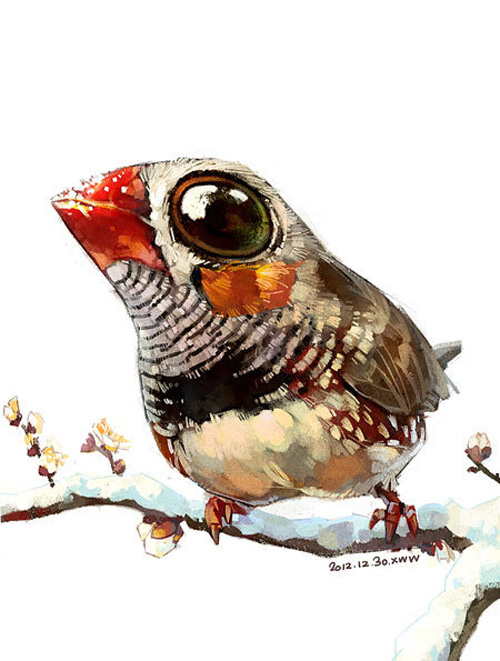
I was scrolling through Pinterest and one of the images jumped out at me, this artist (an artist duo) created some paintings/illustrations that are realistic with a big dash of surrealism tossed in for fun. The image I saw was a zebra finch with an almost ludicrously large head, eyes, and beak.

I had an image of a cardinal bird that I had been wanting to paint, so I took this artists' style and applied it to the cardinal and this is what came out. No one would mistake my rendering for something these artists may have done, but it certainly stretched my horizons.

My image was created using Sketch Guru and finished in Photoshop.

You can see the image that inspired me to take this journey and see more from this pair of artists here:
http://www.myowlbarn.com/2013/08/illustrations-by-chinese-duo-xue-wawa.html

http://cre8365.com/

Tuesday, January 27, 2015

CRE8365 day 26 - Digital Koi

My submission for the day is a Koi fish done in Sketch Guru, then I popped it into Photoshop to adjust the color saturation and contrast. I have noticed that the work I do on my tablet looks richly colored, but once I move it to my laptop, it seems to lose color and contrast, I'm not sure which one is giving me a true representation...

A few years back I drew a koi in a pond with lily pads, this was inspired by another artist's painting. I wanted to do something somewhat serious in a less than serious medium, Crayola Crayons, what is less serious than crayons?
http://cre8365.com