Showing posts with label CRE8. Show all posts

Thursday, April 16, 2015

Western Scrub Jay in Derwent Inktense

I am following a wonderful artist Rebekah R Jones, she does art journaling in Bibles, this intrigues me very much, I added more links to Rebekah at the bottom of the page.

This is my second attempt at art journaling in a book, I will eventually start working in a Bible, but want to get better (and more confident) before I start working in my Bible.

Here is my first attempt, I had to find a book I was willing to practice in, fortunately we have a plethora of books around here :) I also went to our local library and local used bookstore recently and found a Bible and another book that lays flat quite nicely. This picture was done in watercolor and ink.

Here is the painting I did today, it was done using Derwent Inktense blocks and pencils, the idea was to make it transparent enough to still be able to read the text below, the picture above I got a bit heavy with the brown on the roof, I am a lot more satisfied with the picture from today, I worked in thin transparent layers, building up each layer until I was happy with the amount of color. You can tell I am happy with this one because I signed it :)

I joined a free site called Paint My Photo, it's a place where very fine photographers upload their photos specifically for artists to use as reference, I have been uploading pictures of my local area, landscapes, animals, flowers and such. This is my first painting done from a photo there.

Rebekah R Jones blog, FaceBook, YouTube, Pinterest.

Saturday, March 28, 2015

CRE8365 Day who knows :)

I have gotten so far behind on my "daily" creations, I have no hope of catching up, I have done quite a few that I haven't posted here, so I'll go ahead and post the ones I have done, no more counting them though, I'll create and post, KISS (keep it simple stupid) is my motto now :)

digital art girl

digital art uppity groundhog

photo art view from my yard

digital art armadillo

digital art baby

naughty bears

line art sketch-windy day in the garden

windy day colored with colored pencils

quick pencil sketch of cacti

digital art psycho rabbit

a snapshot of a snowy icy drive

http://www.cre8365.com

Saturday, January 31, 2015

CRE8365 day 30 - another Scrub Jay in Inktense

This wasn't what I had planned on doing today, certainly wasn't what I was going to do for my daily picture, but a couple of friends came for a visit today, one of them I hadn't seen since before Christmas and had meant to give him one of my bird Christmas cards. Unfortunately I had already given all of them away, I DID have enough, but once people saw them, they started asking for them, how could I say no to that? LOL

Anyhoo, I whipped out my watercolor paper and my  Derwent Inktense pencils and  Derwent Inktense blocks and did this image, I think it's about the 3rd time I've done this same bird, but that's OK, it's one I'm familiar with and I needed to get it done before he left.  

 I think he liked it, I considered doing an Acorn Woodpecker, but I was told he doesn't like them because they peck on his house :)

http://cre8365.com/activity/

Friday, January 30, 2015

CRE8365 day 29 - Jack Rabbit

Day 2 of playing around with Autodesk SketchBook, I was planning on doing another big headed critter, I looked for reference pictures of jack rabbits, a critter we have a plethora of out here, well the big headed part didn't happen, maybe next time it will. Our jack rabbits are pretty big, but thin for their size, their legs are long, especially the rear legs, and they have very long ears that you can almost see through they are so paper thin, that's how they dissipate heat in the summer. They are skittish animals, I love seeing them, except when I am driving, they run zig zag in front of your car, and just when you think they have finally left the road, they race back in front of you to do it all over again.

I looked at several different reference photos to get the jack rabbit and prickly pear cactus just right, I am pretty happy with this one, one detail you might notice is the grass in front of the cactus is called Texas Grama . I did have to finish it in Photoshop to bump up the color saturation and contrast. Use your right-click to view full size.

http://cre8365.com/activity/

Thursday, January 29, 2015

CRE8365 day 28 - Big Headed Acorn Woodpecker

In keeping with yesterday's theme of big headed birds, I decided to try my hand at rendering a big headed Acorn Woodpecker, this one was done on a different program, I decided to go ahead and get an app called Autodesk SketchBook, there is a free version, but I went ahead and purchased the Pro version, at just under $5.00 I felt like it was worth it to have all the extra features.

I played around with the different brushes for a bit, then got down to business with this image. Some of you might recognize this from the Christmas cards I did, I used the reference photo of the Acorn Woodpecker and made it's head (eyes and beak) really big in proportion to the rest of it. I also added in a bit of a background with Scrub Oak tree leaves.

I am blown away by the new tools I have at my fingertips, the layers, the blending, the ability to turn the image and zoom in so much on my tablet.

Here is the picture:

http://cre8365.com/

I had someone ask me on FaceBook if I was digitally editing existing pictures, meaning opening an existing picture and applying filters and such to get a painterly look, and to that question, my answer is no, all of my images here are completely created from scratch, whether on paper or digital, everything from the initial sketch to the finishing touches are all mine, I may use a reference photo, but that photo is on my laptop, and I am drawing on paper or on my tablet. I am flattered that someone thought my picture was good enough that I edited an existing photo, but no, it's all me :)

Wednesday, January 28, 2015

CRE8365 day 27 - Cardinal rule

I have had a lot of fun playing with bird images, drawing and painting them, I have worked hard to try to get them looking real, today I wanted to play, one of the way we as humans learn is to emulate what another does, notice I didn't say "copy", but emulate, just ask any toddler and they will tell you :)

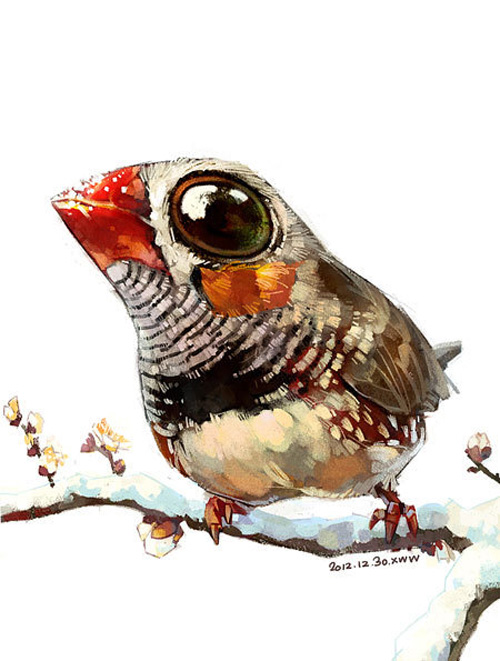
I was scrolling through Pinterest and one of the images jumped out at me, this artist (an artist duo) created some paintings/illustrations that are realistic with a big dash of surrealism tossed in for fun. The image I saw was a zebra finch with an almost ludicrously large head, eyes, and beak.

I had an image of a cardinal bird that I had been wanting to paint, so I took this artists' style and applied it to the cardinal and this is what came out. No one would mistake my rendering for something these artists may have done, but it certainly stretched my horizons.

My image was created using Sketch Guru and finished in Photoshop.

You can see the image that inspired me to take this journey and see more from this pair of artists here:
http://www.myowlbarn.com/2013/08/illustrations-by-chinese-duo-xue-wawa.html

http://cre8365.com/

Tuesday, January 27, 2015

CRE8365 day 26 - Digital Koi

My submission for the day is a Koi fish done in Sketch Guru, then I popped it into Photoshop to adjust the color saturation and contrast. I have noticed that the work I do on my tablet looks richly colored, but once I move it to my laptop, it seems to lose color and contrast, I'm not sure which one is giving me a true representation...

A few years back I drew a koi in a pond with lily pads, this was inspired by another artist's painting. I wanted to do something somewhat serious in a less than serious medium, Crayola Crayons, what is less serious than crayons?
http://cre8365.com

Monday, January 26, 2015

CRE8365 day 25 - Closeup detail of Wandering Jew blossom

I am pretty happy with this one, it's a drawing/painting of a blossom from the Wandering Jew plant in our window. I created this using Sketch Guru and finished it in Photoshop.

This took me 3-4 hours though it didn't seem like it was that long. I feel like I'm getting a handle on Sketch Guru, it's a fairly simple app, but it has lots of potential. I pretty much only use 2 of the brushes available in the app, the line and spray. The only thing I wish that program had was a way to blend or blur, but so far I've been able to work around that limitation.
http://cre8365.com

Saturday, January 24, 2015

CRE8365 day 24 - Rojo the parrot

I drew this image using an app called "Draw and Paint Pad", it's for Android based systems. This is the first thing I've done with this program, I am not as comfortable with it as I am Sketch Guru, but I suspect that will change as I work with it more.

After several starts and stops, I decided to draw a parrot that has been in my family since I was an early teen, she is a Red Headed Amazon parrot, aka Mexican Red Headed parrot. I did this from memory, and in reality she doesn't have that huge blue spot on her cheek, but there is a small bit of blue, you have to be really close to see it. And under the red feathers on her head, it's bright yellow, but you'd never see it unless she allowed you to scratch her head. Mostly though, you see the green body and the red head. I do have the beak a little larger than it really is, I suspect that is a subconscious reaction to being bitten by that beak a few times :)

http://cre8365.com

Friday, January 23, 2015

CRE8365 day 23 - Silly Penguin video tutorial

After uploading the Silly Penguin image to CRE8365, I was asked by Pixelista if there were any tutorials for Sketch Guru, I looked and couldn't find any that suited me, so I dug out my gear and made my own video tutorial. I had hoped to make it short, but it ended up being a half hour long, so I uploaded that one to YouTube, then created another version as a speedpaint tutorial, that one is much shorter, so people can watch either or both.

Here is the real time version


Here is the speedpaint version at 2.5X


http://cre8365.com

CRE8365 Day 22 - Snowy Photographs

Our weather has been so crazy, going from days and weeks of gray, ice fog to shirtsleeve near 70 degrees F, today (technically yesterday now) it snowed several inches of fluffy white snow.

I grabbed my camera and snapped a few pictures, these are my favorite 2 of the whole bunch, no Photoshop editing, it is what you see.

The first one is one of our wood piles, I thought the grain of the wood looked quite pretty, especially against the snow, one log looks like a heart.

The second one is the Sky Castle, it always looks like a fairytale in its blanket of snow.

http://cre8365.com

Wednesday, January 21, 2015

CRE8365 day 21 - Photographs

I decided to play with some photography today, I have 2 photos, the first is a chair done in the fairy furniture style, it's about 4 inches tall, I made this chair a few years ago, it now sits on a shelf over my bed.

The second image, I snapped a couple of days ago, we had been having days and weeks of gray, gloomy, icy days, the sun finally came out and it warmed up, I went outside to snap a few pictures, when I got back inside, I realized I had snapped some 270 pictures! Oh well, I was inspired everywhere I walked.

I particularly liked this one, the warm colored post in the background and the cool colored, gray, weathered stump in the foreground. I popped in into Photoshop and tweaked the image ever so slightly just to enhance the colors.


http://cre8365.com

CRE8365 day 20 - SIlly Penguin

On day 20, the prompt was "penguin", well I figured I could do a penguin, a silly penguin in fact, so that's what I did. I created this in Sketch Guru.

http://cre8365.com

Monday, January 19, 2015

CRE8365 day 19 - Zentangle Featherfall

I really enjoy participating in the CRE8365 challenge to create something everyday, or most days, today on the site one of our artists posted a couple of tangles called Featherfall, the first one was nice, but the second one was spectacular, she had gotten some tips and advice on how to improve hers, she shared the tips on the site and it inspired me to try my hand at drawing Featherfall.

I had seen it before but hadn't tried it yet, this image isn't polished or a "finished" work, it was just practice, but it still falls within the challenge to create something creative everyday.

The black dots on the paper are the bleed through from the Winnie the Pooh drawing I did earlier, I didn't want to waste the paper, so I used it for this practice. You'll also see, on the bottom right corner another tangle called Puf, I saw this demonstrated on YouTube by Tiffany Tangles.

I used a green Inkjoy pen, just because it was handy, and I shaded it with regular pencil.

http://cre8365.com

CRE8365 day 18 - Winnie the Pooh

Now I'm catching up, yesterday was a busy day for me, I had church in the morning, then went to work in the afternoon, it was after 9pm before I got home and still had to write 2 articles for a site where I write and make dinner, so now I'm just complaining, when in reality it was a really good day, I got to go to church, the sermon was fantastic! I got to sing a new song at church and it went over really well, and work, well I haven't been doing much working lately, it was good to get back into doing something I love to do and get paid for it, plus I got to hang out with my work partner and friend, and writing, well I love to write. :)

OK, now to my daily CRE8, the prompt for the day was Winnie the Pooh, a cartoon character I grew up watching and loving. Several other artists on CRE8365 drew some really nice renditions of WtP, so I became inspired to try my hand.

I decided to do a side by side of the newer Disney'esk style and the older, original WtP. I will say right off the bat that I prefer drawing the older style. The newer WtP has more detail, the red shirt, but it's flat, no shading. The old school WtP has less detail, no red shirt, but the coloring is more delicate and has some subtle shading in the fur.

I sketched this in pencil, then did the line work using a Nano-Liner in 05 size, then I colored it using Cra-Z-Art colored pencils. I was reminded why I don't like Nano-Liners, the ink is "heavy", it bleeds through the paper, this paper is made for pen and ink work, yet the ink still bled through, it also has a chemical odor, I suppose that's why I found this pen in the clearance section of Hobby Lobby. :)

The colored pencils are cheap, but they work pretty well, they are not in the same league as Prismacolor pencils, but they work just fine, especially for doing something like this.


http://cre8365.com

Saturday, January 17, 2015

CRE8365 day 17 - Sunrise Photographs and VW Bug sketch

I really felt bad about yesterday's creative endeavor, so today I wanted to make up for it, I actually did 3 things today, the first 2 are photos I took this morning, the sunrise was so pretty. My camera is a lower end mid-range camera, good enough, but it doesn't capture the colors that human eyes can see, the biggest issue is having bright sky and dark land. So I ran the pictures through Photoshop and enhanced the color to make them look more like they really looked to me. I did make them a bit more colorful, but they are really close to how it looks to me.


Later on in the day, I decided to get out Sketch Guru and paint from a picture I took earlier in the year of my old VW bug, it's sitting in my driveway, I love driving that bug, especially out where I live, we have 70+ miles of unpaved mountain roads, those old bugs really go on those kinds of roads. Hubby gave it that paint job, green camo.
http://cre8365.com/
Come on over and join in with the creative fun!

CRE8365 day 16 - Primaries Digital Art

This was the first day I had trouble doing something creative, my sleep schedule had been really off, I was falling asleep, but still wanted to do something, anything, so I went to sumopaint.com and played for a few minutes, after a few starts and stops, I came up with this, not my best work, but it is creative.

I call this Primaries....

http://cre8365.com/